> ## Documentation Index
> Fetch the complete documentation index at: https://ship-jskiller1404-add-ommiting-private-fields-feature.mintlify.site/llms.txt
> Use this file to discover all available pages before exploring further.
# Architecture
> Every technological decision is driven by simplicity. We believe that product used by people is the only reason why technologies exist. Our goal is to help products stand up on their feet without investing too much on early stages.
## Overview
Our technological choices based on the following main tools: [Next.js](https://nextjs.org/), [Tanstack Query](https://tanstack.com/query/latest/), [React Hook Form](https://react-hook-form.com/), [Mantine UI](https://mantine.dev/), [Koa.js](https://koajs.com/), [Socket.IO](https://socket.io/), [MongoDB](https://www.mongodb.com/), [Turborepo](https://turbo.build/repo/docs), [Docker](https://www.docker.com/), [Kubernetes](https://kubernetes.io/), [GitHub Actions](https://github.com/features/actions) and [TypeScript](https://www.typescriptlang.org/).
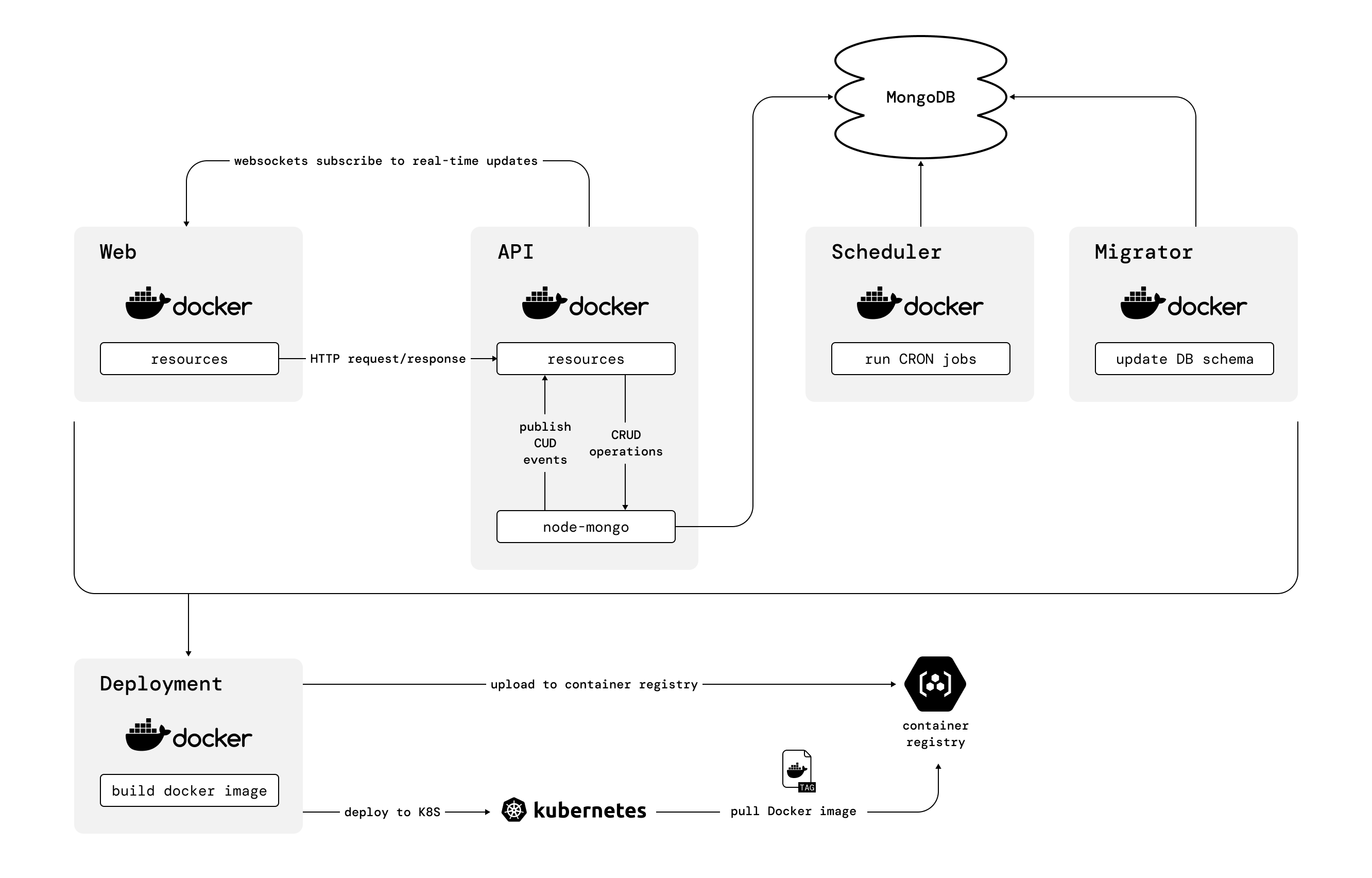
On a high-level Ship consist of the following parts:
The image below illustrates the main components and key relationships between them:
 ## Starting application with Turborepo
To run infra and all services -- just run: `pnpm start` 🚀
### Turborepo: Running infra and services separately
1. Start base infra services in Docker containers:
```bash theme={null}
pnpm run infra
```
2. Run services with Turborepo
```bash theme={null}
pnpm turbo-start
```
## Using Ship with Docker
To run infra and all services -- just run: `pnpm run docker` 🚀
### Docker: Running infra and services separately
1. Start base infra services in Docker containers:
```bash theme={null}
pnpm run infra
```
2. Run services you need:
```bash theme={null}
./bin/start.sh api web
```
You can also run infra services separately with `./bin/start.sh` bash script.
## Starting application with Turborepo
To run infra and all services -- just run: `pnpm start` 🚀
### Turborepo: Running infra and services separately
1. Start base infra services in Docker containers:
```bash theme={null}
pnpm run infra
```
2. Run services with Turborepo
```bash theme={null}
pnpm turbo-start
```
## Using Ship with Docker
To run infra and all services -- just run: `pnpm run docker` 🚀
### Docker: Running infra and services separately
1. Start base infra services in Docker containers:
```bash theme={null}
pnpm run infra
```
2. Run services you need:
```bash theme={null}
./bin/start.sh api web
```
You can also run infra services separately with `./bin/start.sh` bash script.