> ## Documentation Index
> Fetch the complete documentation index at: https://ship-jskiller1404-add-ommiting-private-fields-feature.mintlify.site/llms.txt
> Use this file to discover all available pages before exploring further.
# Retool
## Installation guideline
1. Create an account at [Retool](https://login.retool.com/auth/signup) or request an invite to the existing project. At the moment Retool doesn't allow users to have multiple projects. So keep in mind that it's impossible to use one account on different projects.
2. Download the following `JSON` [config for users management](https://ship-docs.fra1.cdn.digitaloceanspaces.com/retool/users-management.json)
3. Import prebuilt applications: open `Apps` > ` Create New` > `From JSON` and choose downloaded file above.
3. Attach resources (API or Database) for performing Retool queries: СRUD operations with data, HTTP requests, etc. Select the query, click on `Resource` and choose one. Look at the [App Resources](#app-resources) section to see how to connect different types of resources.
Learn how to build more with Retool [documentation](https://docs.retool.com/docs/home).
## Predefined Apps
### Users Management App
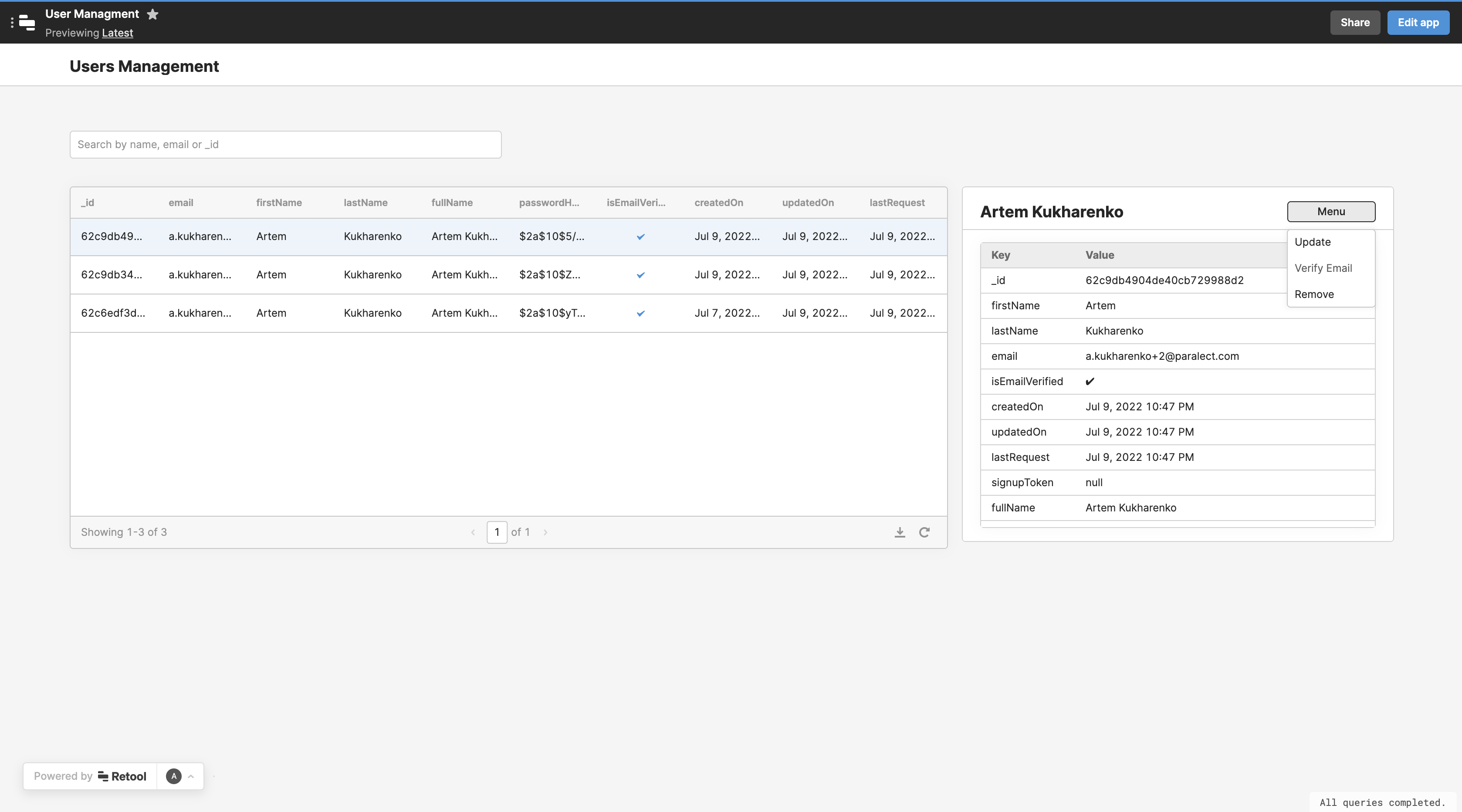
The application is built for user administration, it can be extended and used as internal admin panel. The main features are:
* Users are displayed in the table.
* You can find a particular user.
* You can see the user's details and apply a set of actions to the user. Default actions are: `Update`, `Remove`, `Verify Email`.
 ## App Resources
This section helps you to connect the resources that are used by predefined Retool apps.
### REST API
To connect [**API**](/api-reference/overview) service:
1. Select `REST API` resource
2. Give a name to the resource
3. Write `Base URL` of your server. For local development you need to [tunnel the traffic](#tunnel-http-traffic).
4. Add `x-admin-key` header. The value for `x-admin-key` is stored in config environments as `adminKey`.
### MongoDB
To connect **MongoDB** service:
1. Select `MongoDB` resource
2. Give a name to the resource
3. Select `Use a database connection string`. For local development you need to [tunnel the traffic](#tunnel-mongo-traffic).
4. Write `Connection String` of your database. The value for `Connection String` is stored in config environments as `mongo.connection`.
Learn how to use production and staging environments with Retool [documentation](https://docs.retool.com/docs/using-multiple-environments#configure-environment-resources).
## Local development
For some of [App Resources](#app-resources) will need to tunnel your local traffic.
### Tunnel http traffic
1. Install [ngrok](https://ngrok.com/)
2. Run `ngrok http `
Link example:
`https://617c-93-125-14-163.ngrok.io`
### Tunnel mongo traffic
1. Install [ngrok](https://ngrok.com/)
2. Run `ngrok tcp `. You will see the forwarding link, for example `tcp:/2.tcp.ngrok.io:19888`.
3. Paste generated route to `mongodb://root:root@:19888/api-development?authSource=admin&replicaSet=rs&directConnection=true` link.
Link example:
`mongodb://root:root@2.tcp.ngrok.io:19888/api-development?authSource=admin&replicaSet=rs&directConnection=true`
## App Resources
This section helps you to connect the resources that are used by predefined Retool apps.
### REST API
To connect [**API**](/api-reference/overview) service:
1. Select `REST API` resource
2. Give a name to the resource
3. Write `Base URL` of your server. For local development you need to [tunnel the traffic](#tunnel-http-traffic).
4. Add `x-admin-key` header. The value for `x-admin-key` is stored in config environments as `adminKey`.
### MongoDB
To connect **MongoDB** service:
1. Select `MongoDB` resource
2. Give a name to the resource
3. Select `Use a database connection string`. For local development you need to [tunnel the traffic](#tunnel-mongo-traffic).
4. Write `Connection String` of your database. The value for `Connection String` is stored in config environments as `mongo.connection`.
Learn how to use production and staging environments with Retool [documentation](https://docs.retool.com/docs/using-multiple-environments#configure-environment-resources).
## Local development
For some of [App Resources](#app-resources) will need to tunnel your local traffic.
### Tunnel http traffic
1. Install [ngrok](https://ngrok.com/)
2. Run `ngrok http `
Link example:
`https://617c-93-125-14-163.ngrok.io`
### Tunnel mongo traffic
1. Install [ngrok](https://ngrok.com/)
2. Run `ngrok tcp `. You will see the forwarding link, for example `tcp:/2.tcp.ngrok.io:19888`.
3. Paste generated route to `mongodb://root:root@:19888/api-development?authSource=admin&replicaSet=rs&directConnection=true` link.
Link example:
`mongodb://root:root@2.tcp.ngrok.io:19888/api-development?authSource=admin&replicaSet=rs&directConnection=true`